How to Reduce Support Tickets by 60% with an AI Agent
Most support queues are dominated by the same 10–15 questions. Here's how to identify them, automate the answers, and free your team for the conversations that actually need a human.
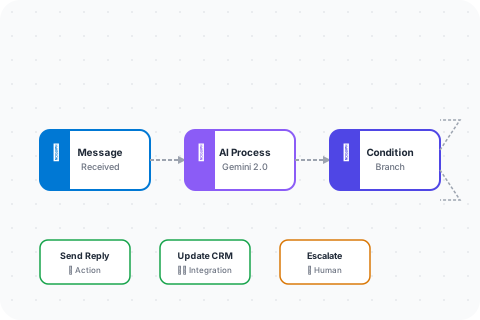
The 80/20 of support tickets
If you pull a report on your last 500 support tickets, you'll almost certainly find that 60–80% of them are variations of the same handful of questions: "Where is my order?", "How do I reset my password?", "What's your refund policy?", "Can I change my subscription?".
These are not complex questions. They don't require empathy, judgment, or institutional knowledge. They require fast, accurate answers — and that's exactly what an AI agent does well.
The goal isn't to replace your support team. It's to stop wasting their time on questions a well-configured AI can handle in under two seconds.
Step 1: Audit your ticket categories
Before you build anything, export your last 3 months of support tickets and tag them by category. Most helpdesk tools (Zendesk, Freshdesk, Intercom) can do this automatically. If you're working from email, a quick manual pass through 100 tickets is enough to identify the top patterns.
You're looking for two things:
- High-volume, low-complexity tickets. These are your automation targets — questions with a clear, consistent answer.
- High-volume, high-complexity tickets. These still need a human, but an AI can triage them, collect context, and route them to the right person faster.
Step 2: Build your knowledge base
An AI agent is only as good as the information it has access to. Before you configure any workflows, you need a clean knowledge base. This means:
- Your FAQ page (if it's accurate and up to date)
- Your return/refund policy
- Your shipping and delivery information
- Your pricing and plan details
- Any product documentation or how-to guides
In SellyChat, you upload these documents directly to the knowledge base. The platform indexes them with semantic search, so your AI can retrieve the right answer even when the customer phrases the question in an unexpected way.
Step 3: Configure your top-5 workflows
Start with the five ticket categories that appear most often. For each one, build a dedicated workflow in SellyChat's no-code builder:
- Order status. Connect the Shopify integration. When a customer asks about their order, the agent looks it up by email and returns the current status — no human needed.
- Refund requests. Collect the order number and reason, check against your policy, and either process automatically or escalate to a human with full context pre-filled.
- Password reset / account access. Verify identity, trigger the reset email via your auth provider, confirm with the customer.
- Subscription changes. Let customers upgrade, downgrade, or cancel through the chat — connected to your billing system via webhook.
- General FAQ. A catch-all workflow that queries your knowledge base and returns a confident answer, with a fallback to human handoff if confidence is low.
Step 4: Set a clear escalation path
The biggest mistake teams make when deploying AI support is not defining when the AI should stop trying. Every workflow should have an explicit escalation trigger:
- Customer explicitly asks for a human
- AI confidence score falls below your threshold
- The issue involves a refund above a certain amount
- The customer has contacted support more than twice about the same issue
In SellyChat, you configure this in the workflow builder as a branch condition. When escalation triggers, the conversation is handed off to your team with the full chat history attached — so the human agent doesn't have to ask the customer to repeat themselves.
What to expect
Teams that follow this approach typically see 50–65% ticket deflection within the first 30 days. The remaining tickets that reach human agents are higher-quality — more complex, more context-rich, and faster to resolve because the AI has already done the triage.
Customer satisfaction scores tend to hold steady or improve, because response times drop dramatically for the simple questions that used to sit in a queue for hours.
Ready to set this up for your business? Start your 7-day free trial — no credit card required.